So, what exactly is AI product photography? Put simply, it’s a way to create professional, studio-quality product images without ever stepping foot in an actual studio. You start with a basic photo of your product, and artificial intelligence places it into any new scene or background you can dream up.
The New Era of AI Product Photography
Think of it like this: traditional photography gives you a camera and a location. AI photography gives you an entire universe of locations, props, and lighting setups, all accessible from your computer. It's not just about cleaning up an image; it’s about completely rethinking how you create visual content for your brand. This technology is your personal, on-demand creative studio.
For direct-to-consumer (DTC) brands, this is a game-changer. The old, painful cycle of booking studios, hiring photographers, shipping products, and dealing with all the logistical headaches is quickly becoming a thing of the past. It’s being replaced by a much simpler, faster digital process.
Beyond Static Images to Dynamic Experiences
The concept is straightforward. You take a decent photo of your product—seriously, your smartphone will do—and the AI handles the rest. The software learns the shape, texture, and lighting of your item and then masterfully blends it into brand-new, photorealistic settings that you describe. This is how you move from boring, white-background shots to images that tell a story.
This is especially powerful for generating a wide variety of content on the fly:
Lifestyle Shots: Instantly place your new skincare product on a marble bathroom counter or your hiking boots at the summit of a mountain. No travel required.
Campaign-Specific Visuals: Need festive images for a holiday sale? Or bright, sunny shots for a summer collection? You can create them in minutes, not weeks.
Personalized Content: Test different backgrounds and styles to see what resonates with specific customer groups, helping you fine-tune your marketing.
By taking the logistical pain out of content creation, AI gives brands the power to produce a virtually endless supply of visuals. Product photography is no longer a massive, expensive project you do twice a year; it's an agile, ongoing part of your marketing machine.
Setting the Stage for Creative Freedom
This shift isn’t just about being more efficient—it’s about unlocking your brand's creative potential. You're no longer held back by the physical world. If you want to see your new coffee blend on a rustic table in a cozy Italian café, you can make it happen with a few clicks.
This freedom opens the door to a whole new level of testing and optimization. You can generate dozens of image variations to A/B test in your ads, on social media, or across your product detail pages. This lets you quickly learn what your audience really responds to, sharpening your visual strategy and giving you a serious edge in a crowded market.
How AI Is Reshaping Ecommerce Photography
To really get a feel for the change AI product photography is bringing, let's walk through two different ways to launch a new product line. The first is the old-school, traditional route, which is often a logistical headache. The second uses a newer, digital-first approach. The difference isn't just about a new tool—it's a complete overhaul of how brands create and use their visuals.
The Traditional Photoshoot Story
Picture this: you’re launching a new line of handcrafted leather wallets. The old way of doing things starts with weeks of planning. First, you have to book a photo studio, find and hire a professional photographer, and track down a stylist who actually gets your brand’s look.
Then the real logistical juggling act begins. You're coordinating everyone's schedules, carefully shipping your products to the studio (and crossing your fingers they don’t get damaged), and maybe even hiring a model. The day of the shoot is an expensive, high-pressure event. Every single hour costs you money, and you’ve got a tight window to get a handful of perfect shots.
For a controlled on-model workflow, see our AI model photoshoot guide, which separates campaign production, virtual try-on, and the product details that still require physical evidence.
But you're not done yet. After the shoot, you wait for the photographer to send over the proofs, you pick the best ones, and then they go off for retouching. The whole cycle, from the first idea to having images you can actually use, can easily take four to six weeks and set you back thousands of dollars. And if you later decide you need a shot with a different background? You’re right back at square one, starting the whole expensive process over.
The AI-Powered Launch Story
Now, let's replay that same scenario using AI. You get the final wallet samples from your manufacturer. But instead of booking a studio, you just take a few clear photos of each wallet against a plain background—your smartphone is perfectly fine for this.
You upload those simple pictures to an AI platform like Look Atlas. Within minutes, you’re generating hundreds of different visual options. Want to see the wallet sitting on a polished oak desk? Done. How about peeking out of a denim jacket pocket? A few clicks, and it’s there. You can create aspirational lifestyle scenes, clean studio shots, and detailed close-ups for every single one of your sales channels.
The entire process, from snapping that first photo to having a full catalog of marketing-ready images, can be done in a single afternoon. This isn't just a small improvement; it's a complete re-imagining of the creative workflow.
This speed is making waves. The global eCommerce product photography market, which was valued at around USD 1 billion in 2024, is on track to double to USD 2 billion by 2033. A huge driver of that growth is AI. Brands are jumping on these tools to get high-quality visuals without all the manual labor. You can dig into more data on the ecommerce photography market to see just how big this trend is becoming.
To make the contrast even clearer, here’s a simple side-by-side comparison.
Traditional vs AI Photography A Head to Head Comparison
This table breaks down the core differences between the old and new ways of creating product visuals. It highlights the practical, day-to-day impacts on everything from your budget to your marketing agility.
Aspect | Traditional Photography | AI Product Photography |
|---|---|---|
Time to Final Images | 4-6 weeks | A few hours |
Average Cost | $2,000 - $10,000+ per shoot | $20 - $100 per month (subscription) |
Image Variations | Limited to shots taken on the day | Virtually unlimited variations |
Logistics | Studio booking, shipping, model/stylist coordination | None. Just a camera and computer. |
Scalability | Expensive and time-consuming to scale | Instant. Generate thousands of images easily. |
Creative Control | Limited to the photographer's vision and post-production | Total control. Change backgrounds, props, and scenes on demand. |
As you can see, the move to AI is less of an upgrade and more of a complete operational shift. It fundamentally changes the resources required to create compelling product imagery.
Unlocking Strategic Business Advantages
The benefits here go way beyond just saving time and money. Using ai product photography gives your business a real strategic edge that you can see on your bottom line.
Massive Cost Reduction: When you get rid of studio fees, equipment rentals, and travel costs, it’s not uncommon for brands to slash their photography budgets by 90% or more. That’s capital you can pour back into other marketing efforts.
Unprecedented Speed to Market: Getting visuals in hours instead of weeks means you can launch products and marketing campaigns way faster than your competitors. You can actually jump on market trends while they’re still happening.
Creative Freedom and A/B Testing: You're no longer stuck with the handful of shots from one photoshoot. You can generate dozens of different image styles and test them in your ads, on social media, or on your product pages to see what actually drives sales.
Global Scalability: Need images that resonate with customers in different countries? You can instantly create visuals with culturally specific backgrounds and settings without the nightmare of organizing photoshoots all over the world.
At the end of the day, this technology levels the playing field. It gives brands of any size the power to create world-class visual content, letting them turn creative ideas into assets that make money with incredible speed and flexibility.
Your AI Photography Workflow, Step by Step
Making the switch to an AI-powered creative process might seem like a huge leap, but it’s actually more intuitive than you’d think. The big idea is shifting from a physical, hands-on photoshoot to a digital, command-based one. Here, we'll walk through the entire AI product photography workflow, showing you exactly how to get from a simple product picture to a stunning, campaign-ready image.
Forget the high-end camera or professional studio. A clean shot from your smartphone is often all you need to get started. The real magic isn't in the initial photo, but in how you instruct the AI to build the perfect world around your product.
Step 1: Capture Your Source Image
The foundation of any great AI-generated product photo is a solid source image. While you don't need professional gear, a few simple guidelines will give the AI the best possible material to work with.
Think of this source photo as your digital clay. The cleaner and clearer it is, the more realistic and detailed your final creations will be.
Use a Plain Background: Shoot your product against a simple, neutral backdrop like a white or grey wall. This makes it a breeze for the AI to isolate the product from its original surroundings.
Good, Even Lighting: Natural light from a window is your best friend here. Try to avoid harsh shadows or direct sunlight, which can create glares and wash out important details.
Capture Multiple Angles: Snap photos from a few different perspectives—front-on, from the side, a top-down view, and maybe a classic three-quarter angle. This gives you a ton more flexibility when you start generating different scenes.
This first step only takes a few minutes, but it’s arguably the most critical part of the whole process. A sharp, well-lit source image is the key to getting photorealistic results.
Step 2: Upload and Isolate Your Product
Got your source images? Great. The next step is to upload them to an AI product photography platform. The software gets to work immediately, analyzing the photo and digitally cutting out the background to perfectly isolate your product. This usually happens in an instant and is far more precise than spending hours manually tracing paths in traditional editing software.
This creates a clean digital asset: your product floating on a transparent background, ready to be dropped into any environment you can dream up. It’s like having a perfect digital sticker of your product that you can place anywhere.
Step 3: Craft Your Scene with Text Prompts
This is where your creative vision truly comes to life. You'll use simple text descriptions, called prompts, to tell the AI exactly what kind of scene you want it to build. Learning to write clear, descriptive prompts is the single most important skill in this new workflow. The more detail you feed the AI, the closer the final image will be to what’s in your head.
Think of yourself as an art director guiding a photographer. What’s the setting? What’s the mood of the lighting? Are there any specific props or textures you want to see?
Let's look at the difference a good prompt makes:
Vague Prompt: "A skincare bottle on a rock."
Descriptive Prompt: "A frosted glass skincare bottle resting on a wet, mossy stone in a misty green forest, with soft morning light filtering through the trees."
See the difference? The second prompt gives the AI rich details about texture (wet, mossy), environment (misty green forest), and lighting (soft morning light). The result is a far more specific and compelling image.
The core of AI product photography is translating a creative idea into a clear, written instruction. Your prompt is the blueprint, and the AI is the builder that constructs the final image based on your directions.
Step 4: Generate, Refine, and Export
Once your prompt is ready, the AI generates several image variations based on your description in just a few seconds. You can then look through the options, pick your favorites, and even refine them further. Maybe the lighting needs a small adjustment, or you want to try a slightly different angle. You can just tweak your prompt and regenerate until the image is perfect.
When you’re happy with the result, you can export the high-resolution image, ready for your website, social media, or ad campaigns. If you need a higher resolution image than what the platform provides, you can learn more about how to upscale your images with AI to ensure they are crisp and clear on any screen. For brands looking to go even further, exploring options for AI integration in post-production can help automate even more of your creative workflow.
This entire process replaces what used to be weeks of planning and logistics with just a few minutes of focused, creative direction.
Best Practices for Creating Stunning AI Images
Anyone can generate an image with AI. That's the easy part. The real art is creating a visual that’s stunning, on-brand, and actually convinces a customer to click "add to cart." Moving from generic outputs to professional-grade visuals takes a bit more finesse. The strategies that separate amateur results from high-impact ai product photography are all about giving clear directions, sticking to your brand's look, and having an eye for the little things.
This is where the magic really happens—not just in making images, but in making the right images. The key is learning how to steer the AI so it perfectly captures your brand’s unique vibe and speaks directly to your ideal customer.
Master the Art of the Prompt
Think of a prompt as a creative brief for an incredibly fast, slightly literal photographer. The more specific and vivid your instructions are, the better the final shot will be. If you're vague, you'll get vague, uninspired results.
Crafting a great prompt means layering in details to build a complete world for your product. Don't just describe the item itself; describe the scene it lives in.
Specify the Environment: Instead of just "outdoors," try "on a weathered wooden pier at sunrise, with soft morning fog hovering over the water."
Define the Lighting: Words like "dramatic side lighting," "soft, diffused natural light," or "warm golden hour glow" give the AI crucial clues about the mood you're after.
Include Textures and Materials: Add details like "a black silk cloth," "a rough concrete surface," or "dew drops on a green leaf" to bring photorealistic depth to the image.
Of course, the whole process starts with a solid source photo. For some actionable advice on getting that foundational step right, check out our guide on how to take professional product photos with just the basics.
This simple workflow shows how it all comes together, from snapping a quick picture to writing a detailed prompt.
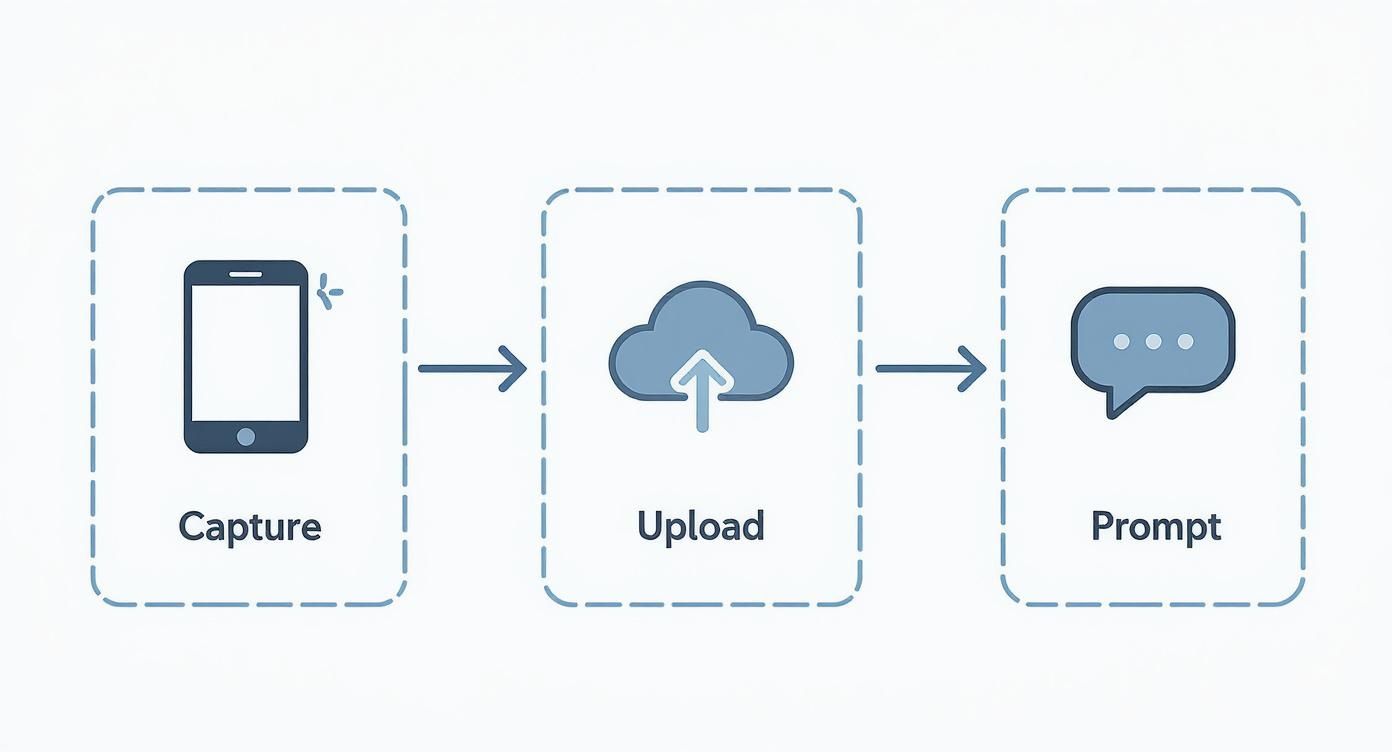
As you can see, your creative vision comes to life during the prompting stage. That’s your moment to inject what makes your brand unique.
Maintain Visual Consistency Across Your Brand
One of the biggest hurdles with AI is making sure all your images look like they came from the same brand. Without a consistent style, your website or social feed can start to look like a random, unprofessional collage.
The fix? Create a "style guide" for your prompts. This is simply a set of keywords and phrases that define your brand’s visual DNA. For instance, a minimalist skincare brand might always use terms like "soft neutral palette," "minimalist composition," and "subtle shadows."
By building a core set of descriptive terms into every prompt, you can generate thousands of unique images that all share a cohesive, recognizable brand aesthetic. This creates a strong, unified customer experience.
The market is clearly catching on to the need for scalable, high-quality visuals. Valued at $1.8 billion globally in 2024, the AI in photography market is expected to more than double to $3.61 billion by 2033. That explosive growth is all thanks to brands realizing they can automate and improve their content creation with these tools.
Avoid Common Pitfalls for Better Results
Like any powerful tool, AI has a few quirks. Knowing the common mistakes ahead of time is the first step toward creating images that are truly effective and photorealistic.
Here are a few key issues to watch for and how to steer clear of them:
Unnatural Lighting and Shadows: The image will instantly look fake if the light on your product doesn't match the background. Be explicit in your prompt about the light source (e.g., "backlit by a setting sun") to make sure shadows fall naturally.
The "Uncanny Valley" Effect: Sometimes an AI-generated scene can feel almost real, but just a little... off. The best way to fix this is by adding a few imperfections. Use phrases like "slightly wrinkled fabric," "a single fallen leaf," or "subtle water spots" to make the scene feel more authentic and less sterile.
Inconsistent Product Representation: Make sure your product’s scale, color, and texture stay true-to-life in every image. Use negative prompts (like
--no distortion) if your tool allows it, and always start with the clearest source photo possible.
By mastering your prompts, staying consistent, and dodging these common errors, you can transform your visuals from simple generations into compelling assets that grab attention and drive real sales.
Measuring the ROI of Your AI Photography
Stunning visuals are great, but the real power of AI product photography is what it does for your bottom line. Switching over isn't just a creative update; it's a smart business move. To really see the value and justify the shift, you have to look past the pretty pictures and focus on the numbers.
Calculating the return on investment (ROI) is what turns AI from a cool new tool into a proven engine for growth. The good news is that the key metrics aren't complicated. We're talking about straightforward savings in cost, gains in speed, and boosts in sales. Tracking these points builds a rock-solid financial case for your new visual strategy.
Key Metrics to Track
To get the full picture, you need to measure both what AI saves you and what it helps you earn. Start by keeping an eye on these essential metrics.
Reduced Production Costs: This one is the most obvious win. Add up everything you'd spend on a traditional photoshoot: studio rental, photographer and model fees, equipment, travel—the works. Now, compare that total to your AI platform's subscription cost.
Faster Speed to Market: In ecommerce, time is absolutely money. How many weeks did a traditional shoot take from start to finish? With AI, that process shrinks to just a few hours. Launching products faster means you start making money sooner. It’s a direct financial gain.
Increased Conversion Rates: Here’s where AI directly pumps up your revenue. Run some simple A/B tests comparing your new AI-generated lifestyle shots against your old-school, plain-background images. Even a tiny lift in your conversion rate can snowball into major sales growth.
Lowered Return Rates: When customers see your product in a variety of realistic scenes and from multiple angles, they know exactly what they’re getting. Better imagery sets clear expectations, which almost always leads to fewer returns.
The core of measuring ROI is simple: compare the old way's costs and timelines with the new way's efficiency and performance. When a brand can cut its photography budget by 90% while simultaneously increasing conversion rates, the financial argument for AI becomes undeniable.
Calculating Your Return on Investment
Let's break it down with a quick, hypothetical example. Say your brand usually spends $5,000 on a single traditional photoshoot. For that, you get about 20 final images, and the whole process takes a solid four weeks.
Now, let's plug in an AI alternative.
Metric | Traditional Photoshoot | AI Photography | Financial Impact |
|---|---|---|---|
Direct Cost | $5,000 | $100 (monthly subscription) | $4,900 savings |
Time to Market | 4 Weeks | 1 Day | Faster revenue generation |
Conversion Rate | 2.0% | 2.5% (from A/B test) | 25% increase in conversions |
The immediate cost savings jump right off the page. But the real game-changer is that 25% uplift in conversion rate. That’s pure profit being added directly to your revenue stream, turning what was once a major cost center into a powerful profit driver.
As you get deeper into creating visuals, remember that skillful ecommerce photo editing is the final, crucial step to make sure every single image is perfectly polished and ready to sell. By tracking these numbers, you can confidently prove the value of AI photography and make smarter, data-backed decisions for your brand.
Where AI-Driven Visual Commerce Is Headed
The world of AI product photography isn't just evolving; it's rocketing forward. The tools we have today are merely the opening act for a much bigger show—one that will completely redefine how brands connect with customers online. The next wave of innovation won't just be about images; it'll fuse AI-generated visuals with other immersive tech to craft truly dynamic and personal shopping experiences.
This isn't just speculation, either. The numbers tell a powerful story. Valued at roughly $450 million in 2024, the AI product photography market is expected to explode to $5 billion by 2035. That's a staggering 24.5% compound annual growth rate, underscoring just how fundamental these tools are becoming. If you want to dive deeper, you can explore more of these AI photography market statistics.
Beyond Static Images to Interactive Experiences
The future isn't about making static photos faster; it's about building a solid bridge between the digital and physical worlds. We're on the cusp of a much more interactive and genuinely engaging form of visual commerce.
Here’s a glimpse of what's on the horizon:
Augmented Reality (AR) Virtual Try-Ons: Picture a customer shopping for a new watch. Instead of just seeing it on a generic model, they can point their phone at their own wrist and see a photorealistic, AI-generated version of that watch appear, perfectly sized and styled, as if it were really there.
Integration with 3D Modeling: Soon, AI won't just create flat 2D images. It will generate complete 3D models of your products. This means customers can spin, rotate, and inspect an item from every conceivable angle, giving them a sense of detail that builds massive confidence before they click "buy."
The end game here is to completely blur the line between looking at a product on a screen and holding it in your hands. AI-driven visuals are the engine that will make these deeply immersive shopping journeys possible.
Navigating the Ethical and Legal Frontiers
As this technology grows more powerful, it naturally brings up some serious ethical and legal questions that every brand needs to think about. Earning and keeping your customers' trust is going to be non-negotiable as these new visual formats become standard practice.
Here are the key things to keep in mind for using AI responsibly:
Image Copyright and Ownership: The rulebook for AI-generated content is still being written. It’s absolutely critical to work with platforms that give you clear commercial rights to the images you create. You don't want to find yourself in a copyright mess down the road.
Transparency in Advertising: Brands need to be upfront about using AI-generated visuals. Authenticity is a huge driver of trust, and you can seriously damage your reputation by misleading customers with hyper-perfected or unrealistic images.
Responsible Representation: AI gives you an incredible opportunity to create diverse and inclusive marketing. Using this power responsibly means ensuring your on-model imagery reflects a genuine spectrum of body types, skin tones, and identities.
As AI visuals get harder to distinguish from reality, knowing how to manage and signal authenticity in the AI era will become essential for maintaining consumer trust. By embracing these future technologies while holding firm to strong ethical standards, your brand won't just keep up—it can lead the next wave of retail innovation.
Your Top Questions About AI Product Photography, Answered
Jumping into any new tech always comes with a few questions. For brands that have the traditional photoshoot routine down to a science, the whole idea of creating images with an algorithm can feel a little abstract, maybe even a bit daunting.
We get it. These are the kinds of practical, real-world questions we hear all the time from brands just starting to explore AI. Let's clear the air and tackle them head-on so you can see what’s really possible.
Can AI Images Actually Look Real?
Yes, and the results are often stunning. I know what you might be thinking—early AI art had that weird, "uncanny valley" vibe. But the models we have today are a world apart. The best platforms can generate images that are so lifelike, they're practically indistinguishable from something a professional photographer would deliver.
The magic is in the tiny details. Modern AI has gotten incredibly good at mimicking natural light, casting believable shadows, creating authentic textures, and even adding those subtle reflections that make a shot feel real. The key to getting it right comes down to two things: starting with a clean, high-quality photo of your product and giving the AI a clear, descriptive prompt to work from.
Isn't This AI Stuff Expensive?
That’s probably the biggest misconception out there, but the answer is a firm no. In reality, it’s a fraction of the cost of a traditional photoshoot.
Just think about all the line items you get to cross off your budget: studio rentals, photographer day rates, hiring models and stylists, renting equipment, shipping products back and forth. All of that just… disappears.
Instead, you’re usually looking at a simple monthly subscription or a small cost per image. For brands that need a constant stream of fresh visuals for different ads, social media channels, and campaigns, the savings add up fast. It’s not an exaggeration to say many brands slash their photography budgets by over 90% after making the switch.
The entire financial model flips. You go from shelling out huge sums for project-based shoots to a small, predictable operating cost. This opens the door for brands on a tighter budget to create world-class imagery and compete with anyone.
Who Owns the Copyright for AI-Generated Images?
This is a fantastic and crucial question. The legal landscape is definitely playing catch-up with the technology, but for professional AI product photography tools, the answer is usually quite clear. It all comes down to the platform's terms of service.
Most reputable services, Look Atlas included, grant you full commercial usage rights for the images you create. This means the final image is yours. You are completely free to use it however you need to for your business, including:
On your e-commerce site and product detail pages
In your paid ad campaigns on social media and Google
For email newsletters, print brochures, and any other marketing materials
Just make it a habit to review the terms of any provider you work with. This simple step gives you the peace of mind to go all-in on creating amazing new visuals without worrying about legal headaches down the road.
Ready to see how AI can completely change your product visuals? With Look Atlas, you can generate an endless variety of on-brand, on-model photos and videos in minutes, not weeks. Stop booking expensive photoshoots and start creating with Look Atlas today.
