
Product Photography Shot List: A Working Template
A product photography shot list should specify one required image per row, not collect a loose set of angles. Each row needs an image job, an exact product or variant, a frame, a destination, any dependencies, and an observable pass condition. That is what makes the document executable on set and reviewable afterward.
This guide gives you a copyable product photography shot list template and a filled example for an unbranded crossbody bag. It deliberately stays narrower than the wider product photography workflow: the workflow controls the production system; the shot list defines the images that system must return.
If you still need lighting, camera, and capture fundamentals, use the professional product photography guide. Here, the focus stays on specifying the deliverables before the first frame is made.
Map each image to a question before choosing an angle
“Front, side, detail, lifestyle” sounds organized, but it does not say why an image exists or where it must work. Begin with the buyer or channel question. Then choose the view that answers it.
Buyer or channel question | Shot to schedule |
|---|---|
What exactly is being sold? | Identity/main: correct variant, full silhouette, channel-safe crop |
How is it built or opened? | Construction: alternate angle, interior, back, underside, or closure |
What is the material or small feature? | Detail: texture, finish, label, stitching, control, or connector |
How large is it and how is it used? | Scale/use: on-body, in-hand, installed, or beside a truthful reference |
What arrives in the package? | Included items: verified pack-out, accessories, packaging, or bundle contents |
What feeling or campaign context is needed? | Campaign: styled scene with an explicit crop, destination, and protected product facts |
Choose the image job before the camera angle; remove rows the product and destination do not need.
This is a coverage matrix, not a universal shot count. A bottle may need a readable ingredient panel and dispensing action. A handbag may need an open interior, strap drop, hardware detail, and on-body scale. A chair may need joinery, upholstery texture, underside construction, and an in-room view. Delete jobs that do not help the product or destination, and add category-specific questions before the shoot.
Give every row six executable decisions
A useful row lets a photographer capture it and lets a different person judge it. “Premium hero, three-quarter angle” does neither. “CB-01 black, identity image, front isolated, 1:1 safe crop, entire silhouette visible, exact leather and hardware, Google main image, no overlay or border” is much closer.
Use these fields in a spreadsheet:
The field names matter less than the decisions they force. image_job prevents two attractive frames from doing the same work. must_not_change protects color, material, proportions, labels, included items, and hardware when retouching or generation begins. dependencies reveals missing samples, props, talent, permissions, references, or measurements before the crew is waiting. observable_acceptance replaces taste-only feedback with a result that can pass or fail.
Keep lens choice, aperture, light position, and other capture tactics in the photographer's technical plan unless a specific constraint makes them part of the deliverable. The shot list should define the required result without pretending every production uses the same method.
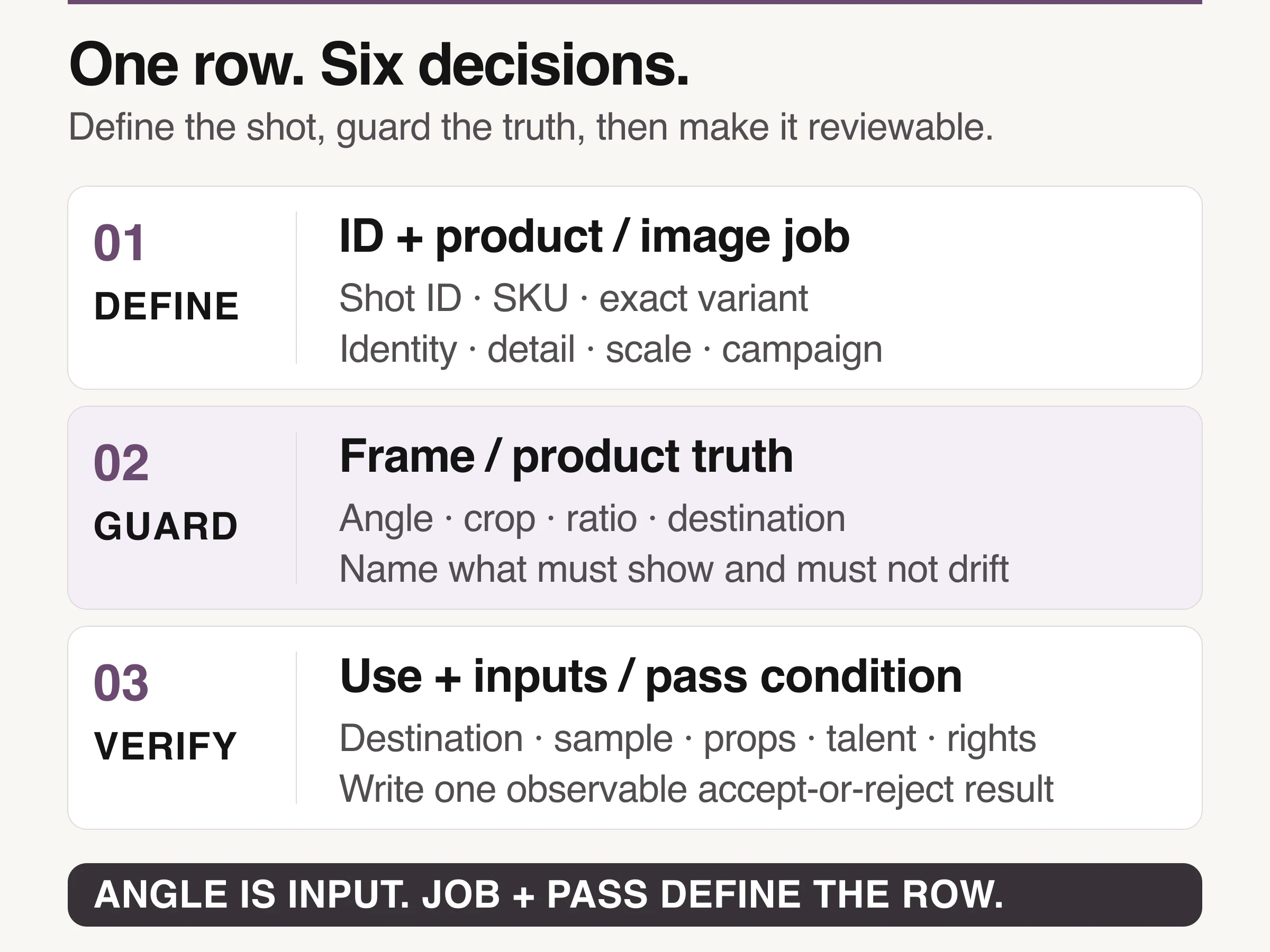
An angle is only one input; the image job and observable pass condition make the row useful.
Sequence the list by shared setup, then protect exceptions
Once the required rows exist, add a sortable setup_family column or use a separate production view. Group rows that genuinely share the same background, lighting family, camera position, support rig, talent, or prop set. Capture the approved base setup across the relevant SKUs before rebuilding the scene.
Do not let efficient grouping erase exceptions. Reflective metal, translucent packaging, open interiors, moving fabric, food, and fragile surfaces may require their own treatment. A black and a pale variant may not tolerate the same exposure or edge control. Put the exception on its own row or flag it as a dependency, rather than trusting someone to remember it on set.
Shopify's current product-photography guidance recommends test photos to confirm that important product details are visible. Use that test frame to validate the hardest row in each setup family. If the black bag loses its edge against the background or the interior pocket disappears, fix the setup before multiplying the miss across every SKU.
Write acceptance criteria that can actually fail
Avoid adjectives that cannot settle a review. “Clean,” “premium,” “dynamic,” and “luxury” may belong in the art direction, but they are weak acceptance criteria on their own.
Weak: “Show the bag clearly.” Strong: “Entire silhouette and both strap connections remain inside the 1:1 safe crop.”
Weak: “Accurate detail.” Strong: “Grain, edge paint, stitch spacing, and matte buckle finish match the approved sample at 100 percent.”
Weak: “Lifestyle image.” Strong: “Bag sits at the model's hip at measured scale; full bag and strap attachment remain visible in 4:5.”
Weak: “Show the set.” Strong: “Every item in the confirmed pack-out appears once, and no item not sold with the product enters the frame.”
If a review note cannot point to the row that failed, the sheet is not controlling the work. Add the missing truth, crop, or dependency to the row instead of leaving the same ambiguity for the next shoot.
Review the contact sheet as a coverage system
After capture, compare the set by image job rather than reviewing files one by one. You should be able to point to the identity frame, construction view, material evidence, scale cue, included-items truth, and any approved campaign extension. Duplication becomes obvious, and so does a missing answer.
The same check protects visual consistency. The product should not quietly change size, color, material, hardware, or included parts as the scene becomes more expressive. Campaign frames may change mood. They do not get permission to rewrite the product.
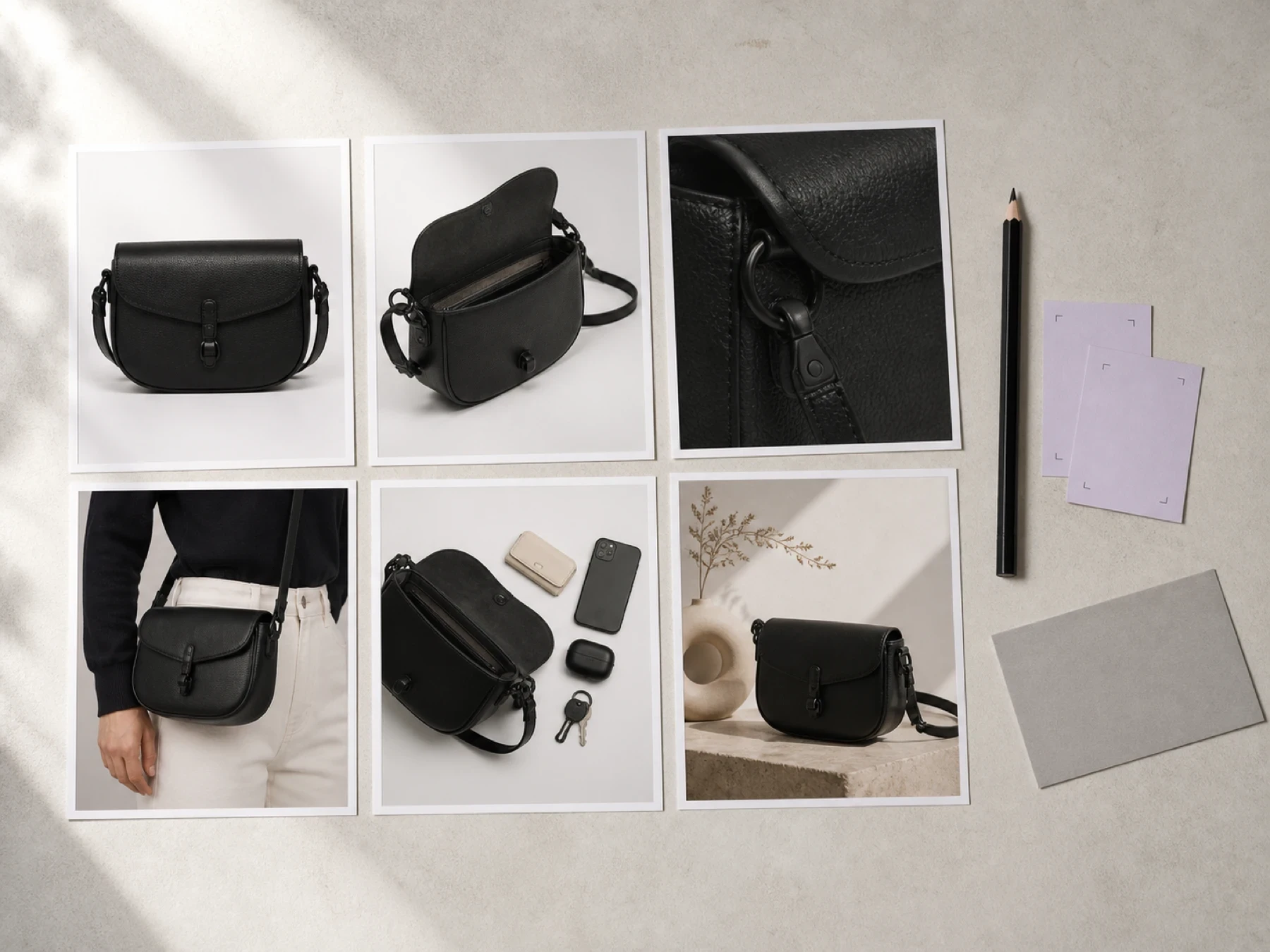
Conceptual illustration: review the set by image job so duplicated views and unanswered questions become visible.
Give variants and dependencies their own rows
A variant is not a footnote when it changes what the buyer receives. Google's current guidance says the submitted image should represent the correct color, pattern, and material for each variant. If navy, black, and embossed versions look different, schedule their required identity rows separately. Do not assume a later recolor will preserve texture, finish, stitching, or printed details.
Dependencies also deserve explicit ownership. An on-body scale image needs the measured sample, final strap setting, approved wardrobe, and talent permission. An included-items image needs the confirmed pack-out. A label detail needs final regulatory copy. A campaign scene may need a prop list and crop-safe art direction. Mark a row blocked when a required input is missing. “We can probably fix it later” is not a status.
Carry shot IDs into tethering, filenames, and selects
Use the shot ID as the common key between the sheet, tether session, raw files, selects, retouching notes, and final delivery. For example, BAG-03_CB-01_black_material-detail_001 is easier to trace than IMG_8472-final-v3.
Adobe's current Lightroom Classic tethering documentation says tethered sessions can be segmented into named shot subfolders, and the current shot name can be changed during capture. If your capture software supports an equivalent structure, use the shot-list ID in that name. The point is not to mandate Lightroom. It is to keep the planning row attached to the files it produced.
Use this filled shot list as the working model
The filled example below uses one unbranded black leather crossbody bag. It is a controlled planning artifact, not evidence that six images suit every bag, that the pictures will meet every marketplace rule, or that the list causes a commercial outcome.
The first row owns identity: correct black variant, complete silhouette, and a destination-safe crop. The second owns construction: an open three-quarter view that reveals the compartment, pocket, closure, and strap attachments. The third owns material proof. The fourth owns scale and use. The fifth verifies what is included in the purchase. Only the sixth moves into campaign context, after the protected facts have been named.
That order exposes a common omission. “Detail shot” is not a complete instruction. A close view of stitching may look beautiful while hiding the buckle finish the buyer needs to inspect. Name the exact feature, then write the acceptance criterion: “leather grain, stitch spacing, edge paint, and one complete hardware junction are sharp enough to inspect at 100 percent.”
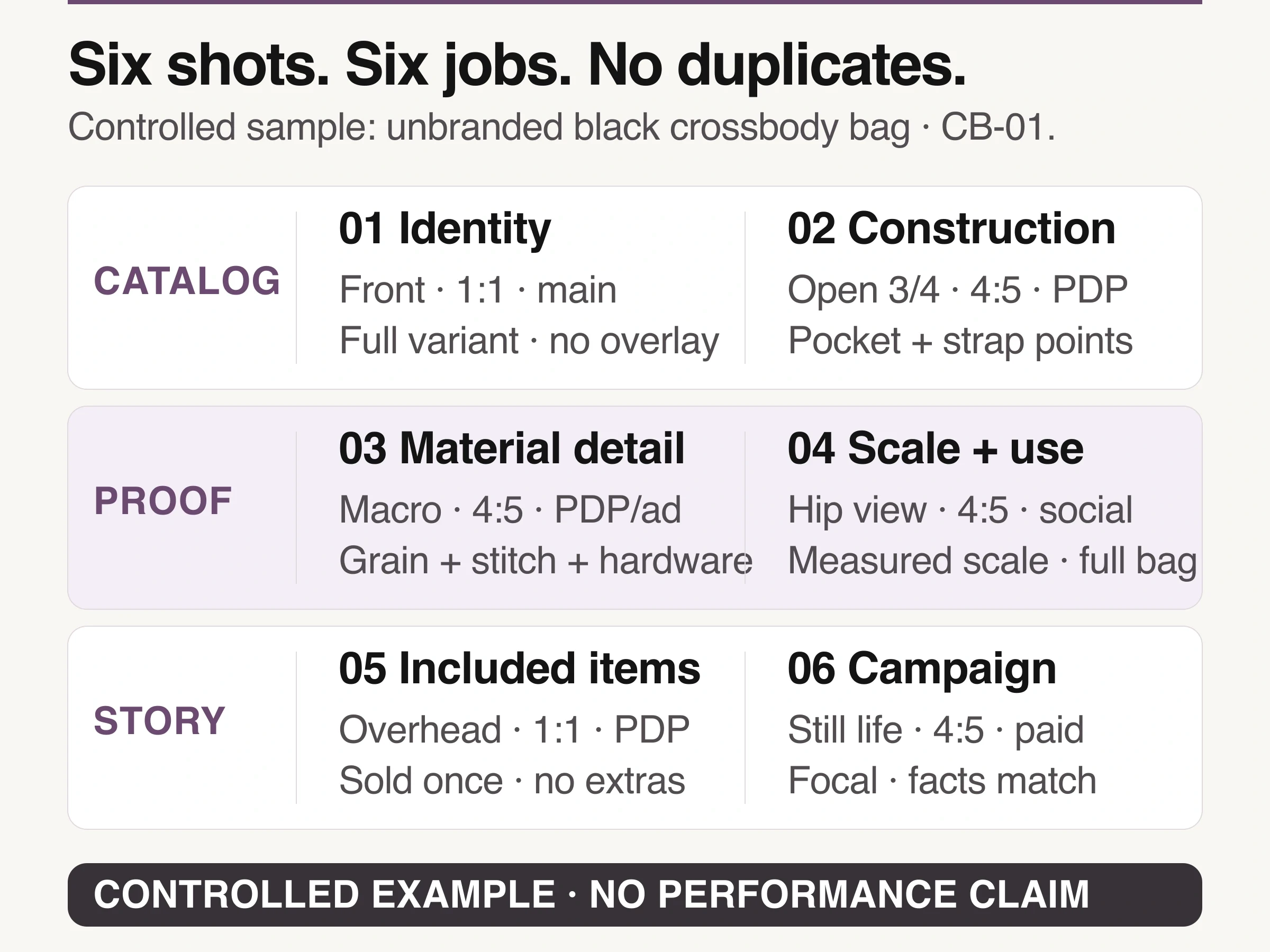
Controlled first-party example: six planned image jobs for an unbranded black crossbody bag; not a performance or compliance claim.
For the identity row, the destination changes the constraint. Google Merchant Center's current main-image specification requires one main image for each product, says it should accurately display the entire product with minimal or no staging, and disallows promotional overlays and borders. Those are Google channel constraints, not a rule that every storefront or campaign frame must look the same.
Treat channel rules as constraints, not a universal stack
Google Merchant Center allows up to ten additional_image_link images and says they can show different angles, product staging, the product in use, or a part without the entire item. Ten is a channel limit, not a target for every SKU. Schedule only the additional views that answer a real question, then verify each destination's current specification before production.
The same distinction applies to crop ratios and backgrounds. A marketplace main image, PDP gallery, paid-social portrait, and campaign landing-page hero can need different frames. One capture may support several destinations when its safe area and product scale were planned. Do not write “all channels” unless somebody has named and checked those channels.
Extend the list only after factual rows are approved
Once the physical master views are approved, the sheet can also control generated extensions. Look Atlas currently supports product-on-model, PDP, advertising, and social imagery from product inputs. Give each generated destination its own row with a reference set, crop, protected product facts, and acceptance condition. The AI model photoshoot guide explains the source-image and fidelity decisions in more depth.
Generated does not mean exempt from channel rules. Google currently requires AI-created product images submitted to Merchant Center to retain metadata indicating their digital source. Preserve required metadata, keep the correct variant, and review the result against the same product-truth fields as a physical capture. For current plan terms, check Look Atlas pricing instead of embedding a price in the shot list.
Build the first sheet around your hardest SKU
Copy the header row, choose the product most likely to expose errors, and fill one row for every image that product genuinely needs. Then ask three questions: Does every row have a distinct job? Can the crew begin without guessing? Can a reviewer reject the result using an observable condition?
If any answer is no, fix the row before adding the rest of the catalog. A product photography shot list is ready when it can survive capture, review, retouching, and delivery without losing the reason each image exists.
