
Macro product photography: frame the detail before increasing magnification
A close photograph of zipper teeth can look impressive while failing to show how the slider joins them. Useful macro product photography keeps the detail the customer needs and enough surrounding structure to explain it. The closest possible camera position is not always the right frame.
Start by naming the feature, deciding its boundaries and choosing how much of its depth must be sharp. Then set the magnification and focus method. This guide works through that decision for a hypothetical zipper assembly; it does not report a physical shoot or a lens-performance test.
Measure the detail you need to include
Put the product on a stable surface and identify the edges that must survive the final crop. For a zipper, that might mean the slider, its pull and the adjoining teeth. For leatherwork, it might mean a seam plus enough material on either side to show its construction. A texture-only image answers a different question.
Measure the required area on the actual product. Keep that measurement in the shoot brief, not as a scale claim inferred from the eventual image. If the required feature is 45 mm wide, plan for more than 45 mm of horizontal coverage so the crop has breathing room.
Magnification describes the size of the projected image on the sensor relative to the subject. Nikon's explanation defines 1:1 as life size on the sensor and 1:2 as half size. It does not describe how large the image looks on a monitor.
For a worked calculation, Nikon publishes a 35.9 mm sensor width for the Z6III. Divide that width by the reproduction ratio: 35.9 ÷ 1 gives 35.9 mm of subject-plane width; 35.9 ÷ 0.5 gives 71.8 mm.
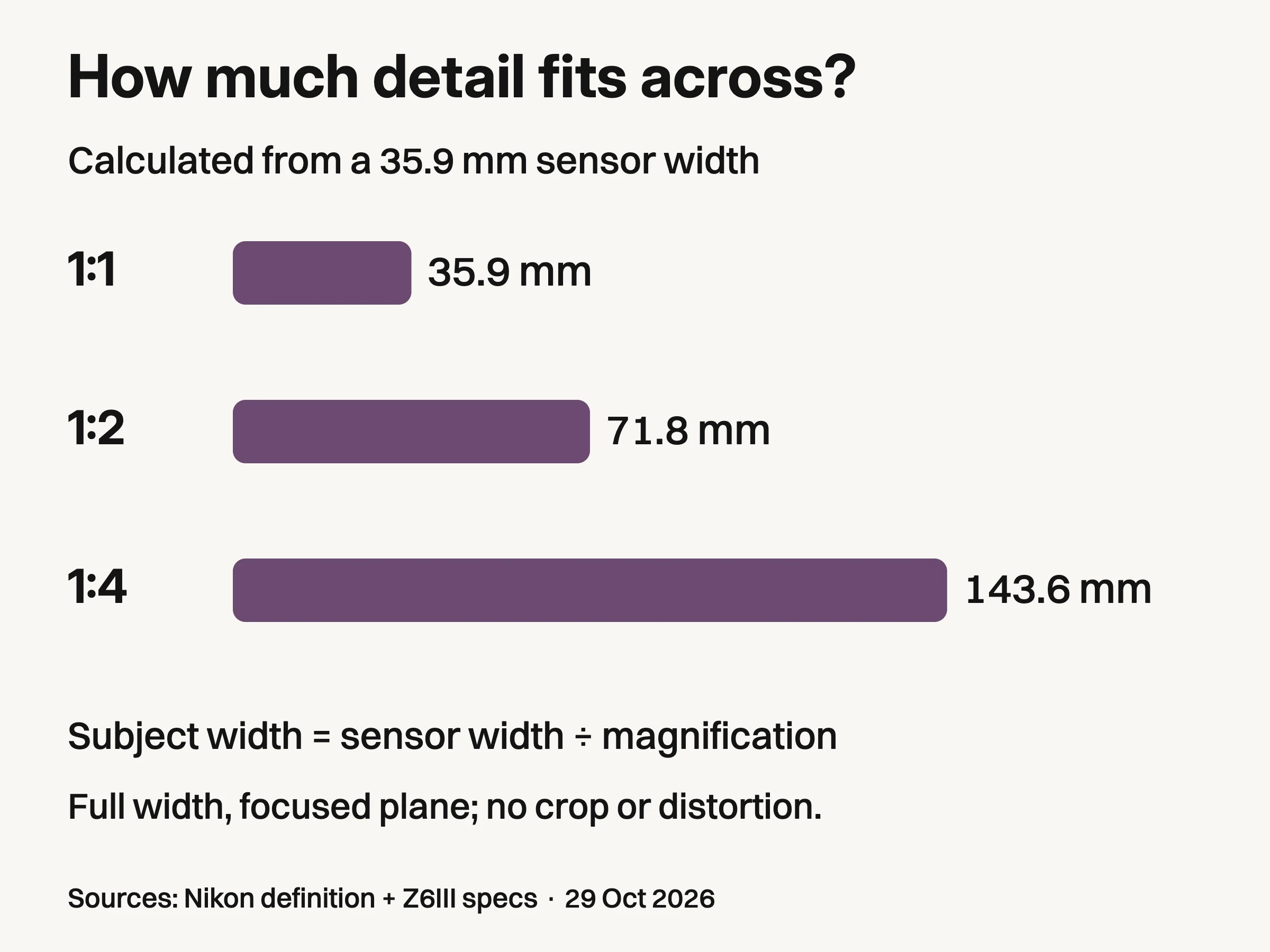
Calculated from Nikon's 35.9 mm Z6III sensor width and reproduction-ratio definition: subject width equals sensor width divided by magnification. Full sensor width at the focused plane, with no crop and ignoring distortion. Not a measured lens test, depth-of-field result or camera recommendation.
These are calculated full-width fields at the focused plane, assuming an uncropped image and ignoring distortion. They are not measured framing, working distance, depth of field or resolved detail. Portrait orientation, camera crop modes and later editing change the available width.
Our hypothetical 45 mm assembly will not fit horizontally into a 35.9 mm field at 1:1 under those assumptions. At 1:2 there is room to include it. Use the calculation to choose a starting frame, then verify the actual capture. There is no benefit in earning a “macro” label by cutting off the information the image was meant to show.
Make one surface easy to photograph
Clean the product using an appropriate method and support it without damaging its finish. Mount the camera securely, choose a plain background and establish a controllable light source. If these basics are new, start with the broader professional product photo guide.
For a flat patch of stitching or an engraved face, begin with that surface approximately parallel to the sensor. This reduces how much the important detail recedes through the frame. Canon's macro sharpness guide discusses aligning the focus plane for flat textures and using support to hold the relationship.
A raised zipper pull is different: the pull, slider and teeth may occupy distinct depths. Decide whether all three must be sharp. If the image only explains leather grain, a soft metal edge may be acceptable. If it explains how the closure is built, that same blur can hide the answer.
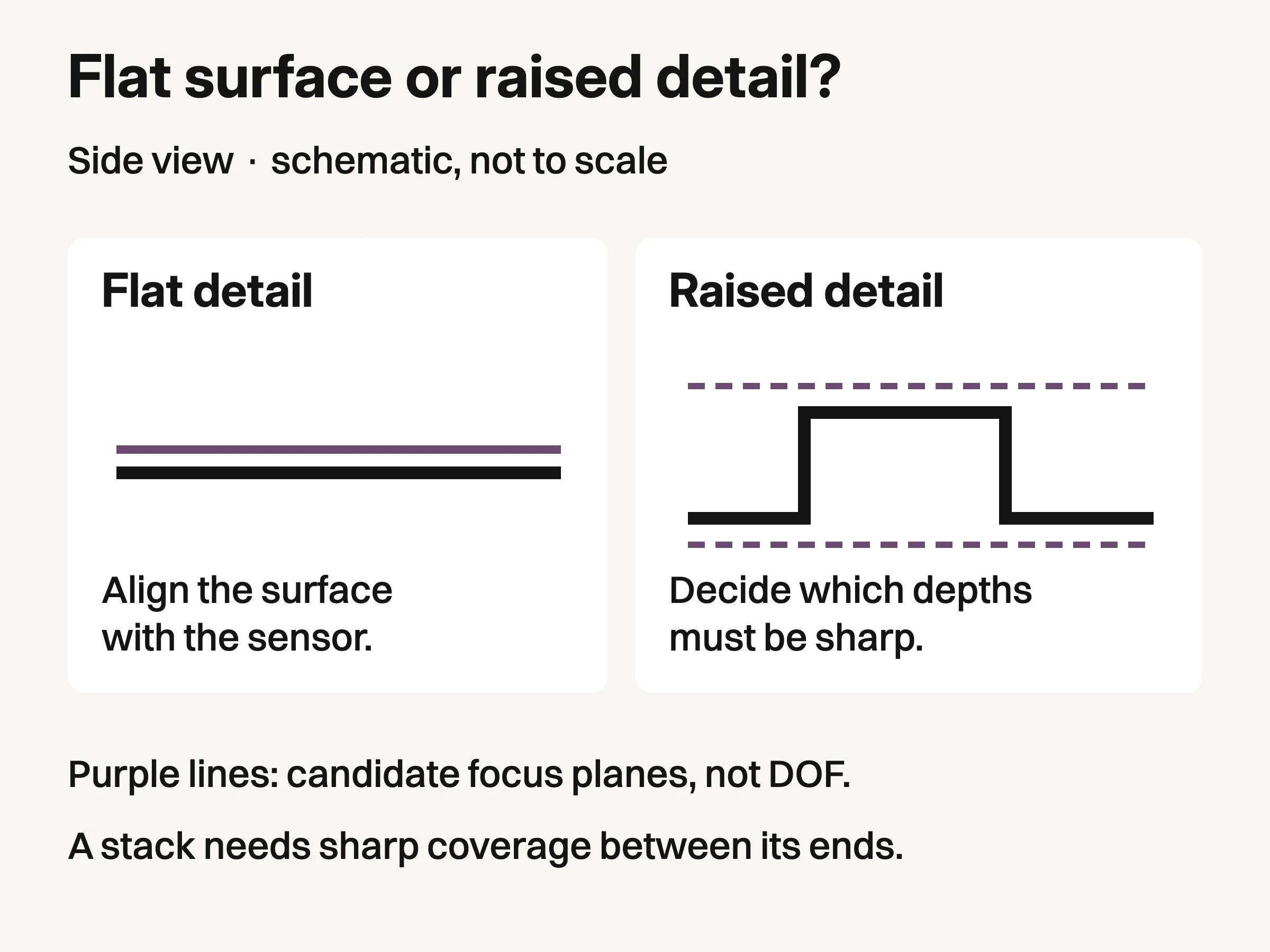
Side-view schematic, not to scale. Purple lines indicate candidate focus planes, not measured depth of field or a prescribed number of captures.
The schematic separates a surface that can be aligned from a raised feature that needs a depth decision. It is not a depth-of-field calculation. Do not infer a universal focus-step distance or number of exposures from it.
Shape the light while watching the feature, not just the histogram. A broad bright reflection can make polished metal visible, but it can also hide engraving. Move the source or a card until the required edge or texture is readable, then leave the arrangement fixed for the focus test. A brighter file cannot recover a detail concealed by the reflection itself.
Try one exposure before building a stack
Focus on the important detail using a magnified view, make a capture and inspect the required near and far edges. Do not judge only the sharp point at the center. First see whether a modest change of viewing angle can bring the important surface into a more useful alignment.
Choose the aperture by the result. Canon explains the trade-off: stopping down can increase depth of field, while very small apertures introduce diffraction and exposure compromises. A moderate setting such as f/8 can be a test starting point on suitable equipment, not a universal recipe. Compare actual files from your camera and lens.
If one exposure shows every required detail clearly, keep it. If the subject is static but necessary features remain at different focus depths, a focus stack may be useful. If nothing is sharp, investigate camera movement, missed focus or insufficient capture detail first. Combining a sequence of blurred frames does not supply a sharp source for the missing feature.
Capture a sequence that can actually be merged
Use the same composition, lighting, exposure and white balance throughout. Keep the product still and avoid touching the camera between frames; a remote release or timer can help. This is a proposed capture method for your own setup, not a sequence completed for this article.
Begin with the nearest required feature in focus. Move focus gradually through the subject, making overlapping sharp regions in successive captures, until the farthest required feature has been covered. Check the sequence before clearing the set. Each necessary detail should be sharp in at least one source frame, and there should be no unrecorded interval between sharp regions.
The number of frames depends on magnification, aperture, subject depth and the chosen focus increments. Do not copy a fixed frame count from an unrelated product. If your camera has focus-shift shooting, consult its manual for compatible lenses and step controls, such as the Nikon focus-shift guidance. Leave a little framing margin because alignment during merging can reduce the usable crop.

Conceptual illustration: independently generated fictional detail, not the hero product, a source frame or a merged focus stack.
Adobe's focus-stacking workflow takes a sequence with different focus areas into Photoshop layers, aligns them, then uses Auto-Blend with Stack Images. The article uses Lightroom to select and send the files; the merge described there happens in Photoshop. Dedicated stacking software is another route, but software choice does not remove the need to inspect the result.
Preserve the individual captures and the layered or editable composite. A flattened final image alone makes it harder to determine whether an odd edge came from the product, one source frame or the merge.
Reject a composite that changes the construction
Inspect the merged image at full resolution, especially where near and far edges overlap. Then inspect the final delivery size. A composite can appear broadly sharp while showing a local fault that changes the apparent product.
What you see | What to check before delivery |
|---|---|
A soft band between otherwise sharp regions | Find a source frame that resolves that depth. If none does, capture the missing coverage. |
A doubled tooth, pull edge or seam | Compare the source frames and alignment. Repair from a truthful source or reshoot. |
A halo around the raised pull | Inspect the blend mask and the source edge; do not erase real metal to conceal the seam. |
A bright patch with no readable engraving | Check whether the detail is visible in any source. Change the reflection and recapture if it is hidden throughout. |
Proposed inspection method for your own captures; no defects are claimed to have been observed in the conceptual illustrations.
This is a proposed review method, not a report of observed defects in the conceptual images. Compare repaired areas with the actual product or a trustworthy source capture. Removing a loose dust fiber is different from smoothing away a real seam or changing the shape of a tooth.
Deliver the close detail alongside a wider identifying view. The wider image explains where the feature sits; the macro image makes its construction or material inspectable. Neither should be asked to prove physical dimensions without appropriate measurement evidence.
Keep factual detail separate from creative extension
Approved physical product images can support later studio, lifestyle or campaign exploration in Look Atlas. They should remain the reference when reviewing generated imagery. We are not claiming that Look Atlas reconstructs missing macro detail or performs the focus-stacking process described here.
Check the current Look Atlas pricing when planning that separate creative work. Preserve the original capture and any stack sources regardless of the downstream tool.
The finished macro assignment is a useful pair: one image identifies the product and the location of the feature, while the close frame shows the required detail without cutting off its meaning. Stop increasing magnification when it stops helping that pair.
